


Anime Motion Capture
July 7th, 2:15 pm
Room 404 AB
Learn how to create Anime with Motion Capture. With a quick introduction to Mocopi plus creator tools in Unity, UNREAL and Wonder Studio. We will cover creating and acquiring avatars as well as animation, video capture and world building. Regardless of genre, bring your Characters, Worlds & Stories to life!!

AX2024 Panel
Mocopi

Mocopi is a portable motion capture system developed by Sony, designed to track and record human movement with high accuracy. It consists of small, lightweight sensors that are attached to the user's body and communicate wirelessly with a smartphone or computer. Mocopi is particularly useful for applications in animation, virtual reality (VR), augmented reality (AR), and gaming, allowing for the creation of realistic character movements and interactions. Its user-friendly design and advanced technology make it accessible for both professionals and enthusiasts in various creative fields.
UNREAL

Unreal Engine is a powerful and widely used FREE 3D game engine developed by Epic Games. It provides a complete suite of tools and functionalities for creating high-quality, interactive, and visually stunning games, as well as immersive virtual reality (VR) experiences.
Unreal Engine is renowned for its cutting-edge graphics capabilities, allowing developers to create realistic environments, characters, and special effects. It supports advanced rendering techniques such as dynamic lighting, global illumination, and physically-based rendering, resulting in visually impressive and lifelike visuals.
Unity 3D

Unity is a powerful and widely used FREE 3D development platform and game engine. It provides a comprehensive set of tools and features for creating interactive and immersive experiences, including games, simulations, virtual reality (VR), augmented reality (AR), and more.
Unity offers a user-friendly and intuitive interface, making it accessible to both beginners and experienced developers. It supports a wide range of platforms, including PC, consoles, mobile devices, and VR headsets, allowing developers to target multiple devices with their creations.
Blender
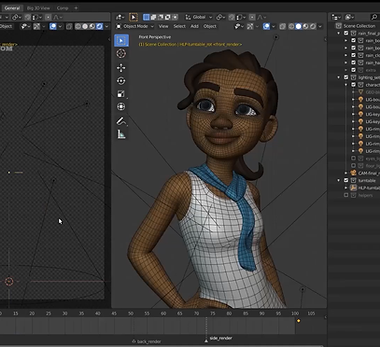
Blender is a powerful and versatile open-source (FREE) 3D computer graphics software. It offers a comprehensive set of tools for modeling, animation, rendering, video editing, and more. Blender is known for its flexibility and extensive feature set, making it suitable for a wide range of creative projects, including 3D modeling, visual effects, game development, and architectural visualization.
ADOBE

Adobe offers a comprehensive suite of software applications that are widely used in various creative industries. These applications provide powerful tools for graphic design, photo editing, video editing, web development, and more. Here are some key Adobe software applications: Photoshop, Illustrator, Premiere, After Effects.
Web Motion Capture

Webcam motion capture software utilizes a computer's webcam to track and capture the movements of a person or object in real-time. It enables users to create animations, perform motion analysis, and control virtual characters or objects through their own movements.
The software typically uses computer vision algorithms and machine learning techniques to detect and track specific points or markers on the user or object being captured. These markers can be predefined patterns or natural features that are identifiable in the video feed.